Core Concepts
Python Scripting of the C++ Modules
Yggdrasil is first and foremost a C++ code, but the user does not run the code from a C++ main();. Rather, the user constructs
a Python script that invokes the relevant C++ modules and passes data between them in Python’s __main__():.
Dimensionality
Yggdrasil is designed from the start to be extensible to multiple spatial dimensions. This is accomplished by templating most classes on integer dimensionality. For example,
template <int dim>
class Kinetics : public Physics<dim> {}
defines a derived class Kinetics that operates in 1, 2, or 3 spaital dimensions. When templated classes are Python wrapped in Yggdrasil,
they typically specify dimensionality in their instantiated name, e.g. Kinetics2d.
Units and Constants
Yggdrasil is unit agnostic. That is to say, the code does not prescribe any particular units for you. However,
for most problems, you will want to define your units in order for certain universal constants like G to have their
correct values. This is done via the PhysicalConstants object which has two constructor methods. You can either supply
the full scope of your desired units with unit length (in meters), unit mass (in kg),
unit time (in seconds), unit temperature (in Kelvin), and unit charge (in Coulomb), or just a subset of the first three,
whereupon temperature will be assumed to be Kelvins and charge will be assumed to be Coulombs.
For example, in order to simulate something like the Earth with state quantities near 1, you may choose to instantiate your units like so:
myUnits = PhysicalConstants(6.387e6, 5.97e24, 1.0)
From these units, Yggdrasil will calculate at the time of the constructor new values for all of the universal constants to use in your chosen physics packages.
Yggdrasil also comes with some helper methods for a handful of frequently used unit systems in
Units.py, like MKS(), CGS(), and SOL().
Simply invoke them with myUnits = MKS() if you’ve imported the Units module.
Note
The PhysicalConstants object is typically passed to a physics package via the constructor for that package. Not all physics packages
require a PhysicalConstants object.
Fields and Nodelists
Fields are essentially decorated std::vectors that come with some additional functionality that make them
assignable to various physics packages by name, e.g. density may be a Field that certain physics classes create and evolve
as part of the state. This way, if multiple physics packages use the same Field names, they will be able to operate on the same data in
an operator split mode.
Note
Yggdrasil does not currently support the use of multiple Field objects with the same internal name. If you try to assign two Fields
with the same name to a Nodelist, Yggdrasil will raise an error.
Yggdrasil’s primary container for state data is the Nodelist class. Fields are assigned to a Nodelist for containerization
of data, for pairing of different Field data into a state, and for state copying. Most physics packages will expect a Nodelist
to be passed as a constructor argument to keep track of
which state vectors the physics package is intended to evolve.
When a Field is assigned to a NodeList, it can be accessed from within Python as an attribute on that NodeList, e.g.
myNodeList.density which returns a Pythonic list of the Field’s type, in this case Python floats.
However, this requires that the Field has been assigned to the Nodelist first, either via the construction
of a Physics package that creates it (and enrolls it) or manually from within the Python runscript via
myNodeList.insertFieldDouble("density").
Note
Yggdrasil does not assume any specific Fields (except id) are necessary without a physics package first
creating that Field and then assigning it to the Nodelist. If you try to access a Field called density inside
a problem without any physics classes that use density, Yggdrasil will raise an error, unless you have manually created that Field yourself
within your problem script.
Generators
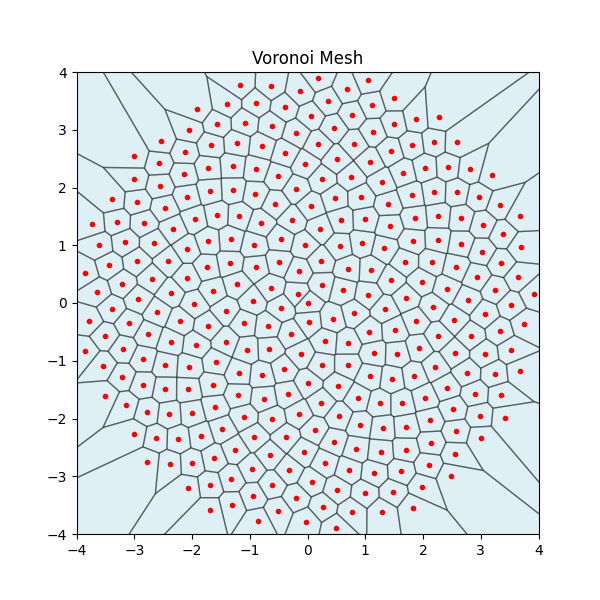
Generators create point distributions for use in particle-based simulations or Voronoi mesh generation. Generators return a python list of points in 2d or 3d coordinates inside a unitary bounding box or unit circle/sphere for a chosen number of points.
Below is an example generated distribution of points using the FibbonaciDisk2d generator used as
seed generators for a Voronoi mesh.
Note
Because all of Yggdrasil’s generators return points inside a unitary bounding box or unit circle/sphere,
you’ll likely want to scale, move, and cull them to fit your particular problem. See the nodeGenerator tests
inside the tests directory for examples.
Physics Packages
Physics packages are the primary computational engines of Yggdrasil. With a few exceptions,
all physics packages consume a NodeList and a constants object at constructor time.
Hydrodynamics physics packages also require an equation of state (eos). Physics packages
hold onto State vectors of pertinent Fields and prescribe how their derivatives are to be
calculated. However, physics packages do not themselves advance the state - the Integrators do.
Consult the python class definitions in the src/Physics directory for specific implementation details for each
of the available physics packages.
Assigning multiple physics packages to
the integrator is as simple as passing a Python list of constructed physics objects to the integrator’s constructor.
The order in which you assign these physics objects to
the integrator is the order in which they will be computed (operator splitting). For example,
suppose I’ve created a Godzilla physics object and separately a KingKong physics object, and I want my RK4 integrator to
evolve them in that order, I’d construct the RK4 integrator as RungeKutta4Integrator2d(packages=[Godzilla,KingKong],dtmin=0.01),
or something to that effect.
Equations of State
If a particular physics package requires an equation of state (EOS), you’ll need to pass it in as the eos argument. For example, suppose
I want to use an Ideal Gas EOS for my hydro physics object. I simply create the EOS with eos = IdealGasEOS(5.0/3.0,constants)
and pass it to my hydro physics object as the eos argument:
hydro = GridHydroHLL2d(myNodeList,constants,eos,myGrid).
The current list of available equations of state and their constructors is
IdealGasEOS(specificHeatRatio,constants)
PolyTropicEOS(polyTropicConstant,polyTropicIndex,constants)
MieGruneisenEOS(rho0,C0,Gamma0,S,constants)
TillotsonEOS(constants,**params<from TillotsonMaterials>)
IsothermalEOS(soundSpeed,constants)
Opacity/Conductivity
Opacity and conducitivity are very much an “under development” feature in Yggdrasil. However, the code does currently support a constant opacity model, and by extension, a conductivity that assumes the radiative limit.
Much like equations of state, this opacity model requires a constants object to compute the Stefan Boltzmann constant.
ConstantOpacity(double k0,PhysicalConstants& constants)
Currently, only the thermal conduction physics package requires (and can make use of) an opacity model.
Mesh/Grid Handling
Yggdrasil supports two kinds of meshes: Eulerian grids and Element meshes.
Eulerian Grids
Eulerian grids are invoked with the dimensional Grid class with
myGrid=Grid2d(nx=[int],ny=[int],dx=[float],dy=[float]) to create a 2D grid with nx cells in the x-direction
and ny cells in the y-direction. The dx and dy parameters set the spatial dimensions of a single cell.
Grids in Yggdrasil can be 1D, 2D, or 3D, and the constructor assigns positions to the cells of the grid
in ascending order in each spatial coordinate.
Note
Grids also have an optional setOrigin(Vector) method for moving the
(0,0) coordinate to any location inside your grid, i.e. if you’ve created a 4x4 grid and the first cell has
coordinates (0,0), but you’d like the origin to sit at the center of the grid instead, you can do so simply by invoking
myGrid.setOrigin(Vector2d(2,2)) which will adjust all of the spatial coordinates of your cells to make
the center of the grid the (0,0) coordinate.
Element Meshes
<wip>
Voronoi Meshes
Currently, Yggdrasil can construct 2d Voronoi meshes from a Field<Vector<2>> or a FieldofVector2d if constructed
from within Python. Unique topology is not guaranteed.
See the voronoi_diag.py example for a use-case.
Boundary Conditions
Currently, Yggdrasil has three species of boundary objects: grid boundaries, collider boundaries, and node constraints. Grid boundaries apply to mesh-based physics and collider boundaries apply to lagrangian particles. Node constraints can in principle apply to anything in a NodeList, but are mostly designed for FEM calculations.
Grid Boundaries
The types of grid boundaries used in Yggdrasil are:
DirichletGridBoundary
OutflowGridBoundary
PeriodicGridBoundary
ReflectingGridBoundary
Each of these is available in any of 1d, 2d, or 3d varieties. Grid boundaries are applied directly to the grid cells and so must be pointed at the correct grid object at construction.
box = DirichletGridBoundary2d(grid=myGrid)
Dirichlet grid boundaries have methods for applying boundaries to cells within the grid such as
box.addBox(Vector2d(16,20),Vector2d(20,44)) which would add Dirichlet conditions to the cells
whose positions span 16-20 in x and 20-44 in y.
The full list of available methods for DirichletGridBoundaries is given below.
    def addBox(self,p1="Lin::Vector<%(dim)s>",p2="Lin::Vector<%(dim)s>"):
        return
    def removeBox(self,p1="Lin::Vector<%(dim)s>",p2="Lin::Vector<%(dim)s>"):
        return
    def addSphere(self,p="Lin::Vector<%(dim)s>",radius="double"):
        return
    def removeSphere(self,p="Lin::Vector<%(dim)s>",radius="double"):
        return
    def addDomain(self):
        return
The addDomain method applies Dirichlet conditions to all of the bounds (left-most,right-most,etc.)
of the mesh. The other grid boundary types merely perform addDomain at constructor time and do not
have any special methods.
Warning
At this time, Yggdrasil’s reflecting, periodic, and outlfow boundaries apply to all of the bounds of your mesh, i.e the left and right-most cells will be periodic as well as the top and bottom-most cells in 2d.
Collider Boundaries
Collider boundaries are spherical (or round in 2d) or box-shaped objects that reflect the motion of
lagrangian particles across the normal of their surface. A SphereCollider takes as arguments
a position Vector for the center of the sphere (or circle), a radius, and an elasticity parameter
between 0 and 1. A value of 1 for this parameter means purely elastic collisions with absolute
momentum conservation.
SphereCollider2d(position=Vector2d(x, y), radius=collider_radius, elasticity=0.8)
A BoxCollider takes as arguments two position Vectors that describe
opposite corners of the box and an elacsticity parameter.
BoxCollider2d(position1=Vector2d(x, y), position2=Vector2d(x+width,y+height), elasticity=0.5)
Collider boundaries can be assigned to lagrangian physics packages with the addBoundary() method:
myKineticsPhysicsPkg.addBoundary(myBoxCollider)
Node Constraints
Node constraints are a special kind of boundary class that restrict the motion or behavior of nodes. These are mostly useful for FEM or for debugging. Currently, the available constraints within Yggdrasil are:
MotionConstraint
Integrators
Yggdrasil’s integrators all have essentially the same interface: they take as arguments your physics packages
as packages=[python list], a dtmin=[float] argument to set the lowest allowable timestep, and a verbose=[boolean]
argument that determines whether or not to print to screen which physics package is controlling the timestep. As of Jun 02, 2026, the
integrators available in Yggdrasil are
IntegratorXd - a forward Euler integrator
RungeKutta2IntegratorXd
RungeKutta4IntegratorXd
CrankNicolsonIntegratorXd - an implicit time integrator
The Controller
The controller object is a Python class that issues instructions to the ingetrator object and performs any extra periodic work. Integration steps
are performed using the Step() method of the integrator, and the controller is responsible for issuing these steps and halting the simulation
if a tstop is supplied. The controller is simple enough to be reproduced in its entirety below:
from Integrators import *

class Controller:
    def __init__(self,integrator,periodicWork=[],statStep=1,tstop=None):
        self.integrator = integrator
        self.periodicWork = periodicWork
        self.statStep = statStep # use this to override how frequently we print to the screen
        self.cycle = 0
        self.time = 0
        self.dt = 0
        self.tstop = tstop
    def Step(self,nsteps=1):
        for i in range(nsteps):
            self.integrator.Step()
            cycle = self.integrator.Cycle()
            time = self.integrator.Time()
            dt = self.integrator.dt
            if self.integrator.Cycle() % self.statStep == 0:
                print("Cycle: %04d"%cycle,
                    " Time: %03.3e"%time,
                    " dt: %03.3e"%dt)
            if len(self.periodicWork) > 0:
                for work in self.periodicWork:
                    if cycle % work.cycle == 0:
                        work(cycle,time,dt)
            # for package in self.integrator.getPackages():
            #     package.UpdateState()
            self.time = self.integrator.Time()
            self.cycle = self.integrator.Cycle()
            self.dt = self.integrator.dt
            if(self.tstop and self.time >=self.tstop):
                break
The Flow of the Script
Yggdrasil’s runscripts should be reminiscent of building Legos. Start with the constants object and a NodeList (and a Grid if
you’re simulating something with a Mesh).
myConstants = MKS()
numNodes = nx*ny
myNodeList = NodeList(numNodes)
myGrid = Grid2d(nx,ny,1,1)
Then create your Physics package(s) that use these objects in their constructors.
waveEqn = WaveEquation2d(nodeList=myNodeList,
                         constants=myConstants,
                         grid=myGrid,C=cs)
packages = [waveEqn]
Next, assign boundary conditions to your Physics package.
pm = PeriodicGridBoundary2d(grid=myGrid)
waveEqn.addBoundary(pm)
Construct an integrator that points to the Physics package(s) you want to evolve.
myIntegrator = RungeKutta4Integrator2d(packages=packages,
                                     dtmin=0.01,verbose=False)
Finally, create the Controller and step through the simulation.
controller = Controller(integrator=myIntegrator,
                        statStep=10,
                        periodicWork=[])
controller.Step(1000)